

Cango App: the mobile app on iPhone and Android
Updated: 10 November 2026
Running high-volatility pokies on a phone requires a setup that avoids browser address bars and stray gestures during bonus rounds. Instead of distributing a heavy native binary through external store catalogues, the cango app runs as a Progressive Web Application (PWA) directly from your mobile browser. This architecture creates a standalone shortcut on your home screen, strips away browser navigation frames, and connects straight to the game servers.
Cango casino app: install at a glance
Setting up the cango casino app takes about thirty seconds because you bypass traditional store downloads and install the web manifest straight from the browser engine. The mechanics of a PWA rely on your device’s default browser to package the site interface into a dedicated home-screen icon. Tapping the icon then opens a full-screen window.
| Device | Steps | What you need |
|---|---|---|
| iPhone | Scan the on-site QR code or open Safari, tap the Share icon at the bottom, scroll down, and tap Add to Home Screen | iOS device using the Safari browser, active internet connection, no VPN running |
| Android | Open the site in Chrome, tap the three-dot menu in the top right corner, and select Install app or Add to Home screen | Android phone or tablet with Chrome, stable mobile data or Wi-Fi, VPN turned off |
| Desktop | Open the lobby in Chrome, Edge, or Safari, and click the install icon in the right side of the URL bar if you want a desktop shortcut | Any modern desktop browser, verified account in AUD, EUR, or CAD |
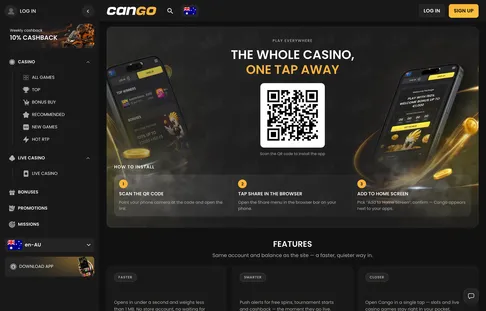
On an iPhone, the process must go through Safari because iOS restricts home-screen web app installations in third-party browsers to Safari’s WebKit engine. If you start on a desktop screen, you can also point your iPhone camera at the QR code displayed on the mobile page to jump straight to the Safari prompt. Our editorial team rates the mobile experience at 4.0 out of 5, reflecting how cleanly the PWA handles game canvases despite not being a native store build.
The install screen behind the Download iOS and Android buttons. The PWA is added from the browser, not from a store.
Cango app: adding it on Android
On Android the cango app installs through Chrome and then behaves like a normal app icon, with its own card in the task switcher. You do not need to change security settings or manually download raw APK files that trigger security warnings. Follow these numbered steps in Chrome to put the lobby on your Android screen.
- Open Google Chrome on your Android phone and navigate to the main lobby page while ensuring any VPN software is switched off, as VPN connections are banned under the platform rules.
- Locate the Download Android button in the site menu or footer, or tap the three vertical dots in the upper right corner of the Chrome browser bar to open the system menu.
- Select the Install app option from the dropdown list; on older Android versions, this line appears as Add to Home screen.
- Review the confirmation pop-up window showing the Cango icon and tap Install to let Chrome compile the shortcut.
- Exit Chrome and check your home screen or app drawer, where the new icon will appear within two or three seconds.
- Tap the icon to launch the standalone window, then sign in using your email and password of 8 or more characters, or tap the Google sign-in button.
Once installed, the shortcut hides the URL bar and browser controls, which leaves more room for bet buttons and the game’s (i) window.
Cango mobile: why it installs from the browser
A Progressive Web Application is a browser-based software model where the user interface, stylesheets, and scripts are cached locally on your phone through a background script called a service worker, while game outcomes and cashier transactions are processed live on the remote server. With cango mobile there is no large download and no manual update. Do not search the App Store or Google Play for the platform, because there is no native store listing and any lookalike icons in those marketplaces are unrelated third-party apps.
Instead, the Download iOS and Download Android buttons on the site trigger the browser’s built-in installation routine. Each launch loads the current lobby, including new releases. If the casino adds a new collection filter or tweaks the layout at Cango casino, those changes load automatically on your next launch without requiring a store patch.
Pokies from studios such as Pragmatic Play, Playson and Booongo are built in HTML5 anyway, so a store app would run the same game files. The PWA simply skips that layer.
Cango download: what works in the app
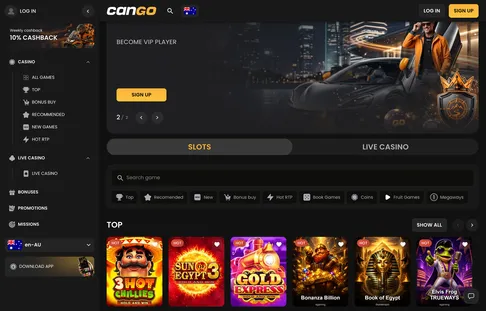
Completing the cango download puts the entire platform inside the home-screen container without stripping out any desktop tools. Every lobby category and mechanic filter sits in the horizontal scroll bar at the top of the screen, including Top, Recommended, New, Bonus Buy, Hot RTP, Book Games, Coins, Fruit Games, and Megaways, alongside themed collections like Asia, Egypt, Jungle, Classic, Mythology, Wild West, and Fishing. You can tap Play demo on pokies to test the volatility of 3 Hot Chillies or Sun of Egypt 3 with virtual credits before committing real funds, or flip the main switch from Slots to Live Casino to stream Lightning Roulette and Crazy Time with table stakes ranging from A$1 to A$5,000 per round. If you run Live Casino tables on your phone, keep your device on Wi-Fi, as high-definition video streams consume mobile data rapidly.
The cashier and promotions work the same inside the mobile window. Deposits start from A$15 by Visa, Mastercard, alternative cashier methods or crypto, and code WP1 with at least A$45 starts the welcome pack of 150% up to A$1,500 plus 300 free spins. As an illustration, A$60 with WP1 adds a A$90 bonus, and x30 wagering means A$2,700 in pokie bets within the usual 7-day window, at no more than about A$7.50 a spin.
After sign-in, Missions, the VIP Club entry and the cashback card appear in the menu. Cashouts (from A$30, up to A$8,000 a week) go to your own card or crypto wallet, and Sumsub verification uses the phone camera for the photo ID and the selfie. The 24/7 live chat floats in the corner, and responsible gambling tools for 18+ players (deposit limits, time-out, self-exclusion) sit in the profile, with outside help from Gambling Help Online and BetStop.
Inside the app you get the same lobby home as on desktop, with the Slots / Live Casino switch at the top.
Cango casino app: frequently asked
Is there a native Cango app download in the App Store or Google Play?
Cango operates exclusively as a progressive web application rather than a store download. On an iPhone, open the site in Safari, tap the Share icon, and select Add to Home Screen. Android users can tap the browser menu and select Install app to place the shortcut directly on their screen.
Are all pokies and bonus features available on the Cango mobile version?
Yes. The mobile lobby has the same categories as desktop, including Megaways, Bonus Buy and Coins, with Play demo on pokies. Missions, the cashier and the 24/7 live chat also work the same way in the app.
Can I claim the welcome bonus and make payments through the Cango casino app?
Mobile players can enter promo code WP1 with a minimum deposit of A$45 to claim the 150% match up to A$1,500 and 300 free spins. Standard deposits start at A$15 via Visa, Mastercard, crypto, or alternative methods. Withdrawals require a minimum of A$30 and process within 24 hours after a 24-hour pending window.
How does account verification work when using a smartphone?
Identity verification via Sumsub works well on smartphones because you can use your device camera to capture the required selfie and photo ID. You also need to upload a proof of address dated within the last 90 days through the mobile cashier. Reviews typically finish within 24 to 48 hours, and VPN usage remains strictly prohibited on mobile networks.